Switches play a crucial role in how a low-profile keyboard feels and sounds. Depending on the switch, your keyboard can feel smooth and silent, tactile and responsive, or extremely loud.
That's why choosing the right switch is so important. You don't want to annoy your coworkers with a loud keyboard or spend hours typing on switches that don't feel quite right.
In this guide, we'll explain the key characteristics to consider when choosing a low-profile switch and compare the four Gateron KS-33 switches available for the Dygma Sonsei.
We'll cover their specifications, typing feel, and, of course, how they sound.
There are four main characteristics to consider when choosing a keyboard switch: switch type, operating force, actuation distance, and total travel.
Switch type
The switch type has the biggest impact on how your keyboard feels. Mechanical switches are generally divided into three categories: linear, tactile, and clicky.

Linear switches
Linear switches offer smooth, consistent movement throughout the entire keypress.
Their resistance gradually increases as you press them, but there is no clear physical feedback when the switch reaches its actuation point.
This makes them a popular choice among gamers and users who prefer a smooth, uninterrupted typing experience.

Tactile switches
Tactile switches have a noticeable bump near the actuation point.
The resistance increases before the key activates and then decreases again. This bump provides physical feedback, helping you feel when the keystroke has been registered.
They're a great choice for typing, especially if you like receiving clear feedback from every keypress.

Clicky switches
Clicky switches also have a tactile bump, but they add audible feedback in the form of a distinctive click.
This sound is produced by an internal mechanism, such as a leaf spring, that activates when the switch reaches its actuation point.
They provide a crisp and satisfying mechanical typing experience, but they may not be the best choice for offices, libraries, or shared workspaces.
Operating force
The operating force indicates how much pressure you need to apply for the switch to activate. It's normally measured in gram-force (gF).
Lighter switches require less effort to press, which can help reduce finger fatigue during long typing sessions. However, they offer less resistance and may make accidental keypresses more likely.
Heavier switches provide more resistance and feedback, but they also require more effort, especially when typing or gaming for several hours.
Actuation distance
The actuation distance is how far you need to press the switch before the keystroke is registered.
A shorter actuation distance can make a keyboard feel faster and more responsive, while a longer distance may provide a more deliberate typing experience.
Total travel distance
The total travel distance is the maximum distance the switch can move before the stem reaches the bottom of the housing.
Low-profile switches naturally have shorter actuation and travel distances than standard mechanical switches.
These measurements also tend to be similar across switches from the same low-profile family, so switch type and operating force will normally have a greater impact on your decision.
Comparing the Dygma Sonsei low-profile switches
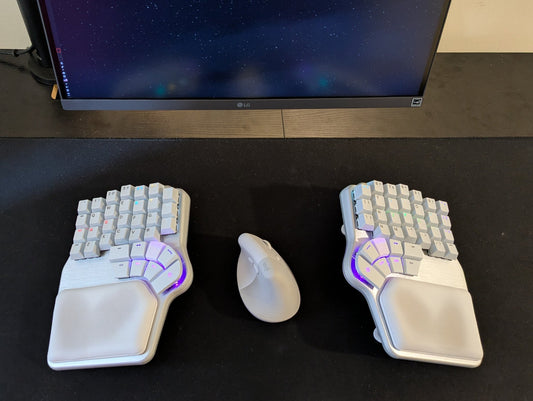
For these tests, we're using the Dygma Sonsei, a plate-mounted low-profile ergonomic keyboard with three sound-absorbing layers inside.
These layers help reduce unwanted resonance and create a more controlled sound profile, allowing each switch's characteristics to stand out.
When ordering the Sonsei, you can choose between four Gateron KS-33 switches:
| Switch | Type | Operating force | Actuation distance | Total travel | Best for |
|---|---|---|---|---|---|
| Gateron Strawberry Chocolate | Linear | 45 gF | 1.7 mm | 3.0 mm | A smooth and balanced typing experience |
| Gateron Silent Red | Silent linear | 45 gF | 1.7 mm | 3.0 mm | Offices, calls, and shared spaces |
| Gateron Banana Chocolate | Tactile | 50 gF | 1.7 mm | 3.0 mm | Typing with noticeable physical feedback |
| Gateron Bamboo | Clicky | 60 gF | 1.7 mm | 3.0 mm | Strong tactile and audible feedback |
Gateron Strawberry Chocolate

The Gateron Strawberry Chocolate switches come pre-installed on the Dygma Sonsei.
They're POM linear switches with a balanced operating force of 45 gF, a 1.7 mm actuation distance, and a total travel of 3.0 mm.
Combined with their linear mechanism, this makes the Strawberry Chocolate switches feel consistent throughout their entire travel.
They produce a pleasant and noticeable sound without being excessively loud, making them a versatile option for both typing and gaming.
These switches are a great choice if you want a smooth, balanced experience that isn't too light, too heavy, too quiet, or too loud.
Gateron Silent Red

If you want to keep your keyboard as quiet as possible, the Gateron Silent Red switches are the safest choice.
They have the same balanced operating force, actuation distance, and total travel as the Strawberry Chocolate switches.
However, their silent construction significantly reduces the sound produced when pressing and releasing each key.
This makes them ideal for shared workspaces, video calls, late-night gaming, or any situation where keyboard noise could be distracting.
Since they don't use the same POM construction, their typing experience isn't as smooth as that of the Strawberry Chocolate switches.
They also don't include a dedicated light guide, so the Sonsei's RGB lighting appears slightly less bright with these switches.

Gateron Banana Chocolate

The Gateron Banana Chocolate switches are POM tactile switches designed for users who want to feel each key being activated.
Their tactile bump provides more physical feedback than a linear switch, making every keystroke feel more deliberate and controlled.
With an operating force of 50 gF, they're slightly heavier than the linear options but still relatively light for a POM tactile switch.
For comparison, the standard Gateron Chocolate tactile switch has an operating force of 55 gF.

The Banana Chocolate offers a similar tactile experience with slightly less resistance, helping reduce fatigue during longer typing sessions.
They also produce a slightly more muted sound than the Gateron Strawberry Chocolate switches.
Choose the Banana Chocolate switches if you want a noticeable tactile bump without moving to an especially heavy switch.
Gateron Bamboo

The Gateron Bamboo switches are POM clicky switches that combine a smooth keypress with both physical and audible feedback.
Along with the tactile bump, they produce a crisp click when the switch activates.
That sound makes every keystroke feel clear and satisfying, provided you and everyone around you enjoy clicky switches.
At 60 gF, they're the heaviest of the four options. This is fairly standard for a clicky switch and contributes to its more deliberate and substantial feel.
Their volume also makes them the least suitable option for shared spaces. Your coworkers might appreciate your enthusiasm for typing, but we wouldn't count on it.
Choose the Bamboo switches if you want strong tactile feedback, a crisp mechanical click, and aren't worried about making some noise.

And that's it, those are the 4 low-profile switches available with the Dygma Sonsei.
However, remember that the keyboard is compatible with any low-profile Gateron KS-33 2.0 switch. So you can get those somewhere else and put them on the keyboard.
The only thing to consider is that all the POM switches we offer have been customized for us with a fully transparent light guide, rather than the default frosted, to ensure maximum brightness.

Which switch would you choose? Is there another low-profile switch you'd like us to add to the lineup?
Join the discussion on Reddit or Discord and share your thoughts.
See you there 💜