These are a Logitech K380 from 2018 and a Silver Reed SR10 from 1978.
 They are decades apart yet look oddly similar.
So much so that you could pick almost any typewriter, since the Remington number two, and start typing right away.
It's a bit more tiring and cumbersome, but everything is mostly where you expect it.
That's not good news, though.
Today, you'll discover eight features keyboards inherited from typewriters that make no sense.
1. Row-Staggered Layout
Let's start with the most blatant one: the row-staggered layout.
Why are the keys on keyboards not forming a perfect grid, but organized in rows that are staggered?

Our fingers don't move diagonally; they move vertically.
This is due to a typewriter's physical limitations. Typewriters work with a very simple mechanism: You press a key that activates a lever, then a stamp with the letter is moved into a ribbon with ink, which then presses the ink onto the paper.

That is very simple, but it has one key limitation.
You can see that each key has a lever that goes through here and then goes to the paper.
So if all keys were arranged in perfect columns, all the levers would have to go through the same route, and they would collide.

By staggering them, you avoid collisions.
The thing is that normal keyboards don't have that limitation. There's a secret board underneath that you can arrange however you like.

So why not have them arranged in columns like an ortholinear keyboard?
On ortholinear keyboards, your fingers can move vertically without having to move diagonally, which they don't like much.

However, ortholinear keyboards have one big problem: in order to use them, you have to point your hands together much more than on a normal keyboard.
On a standard keyboard, since the keys are staggered, I can place my hands diagonally and move the fingers diagonally.

In my left hand, if I were to follow the perfect touch typing technique, I would need to move my wrist or bend my fingers.
That's why many people cheat and press some keys with a different finger because they move diagonally like this.
So, you would say this stagger layout makes sense.
But this is due to another limitation inherited from typewriters, the one-slated design.
2. One-Piece “Straight” Design
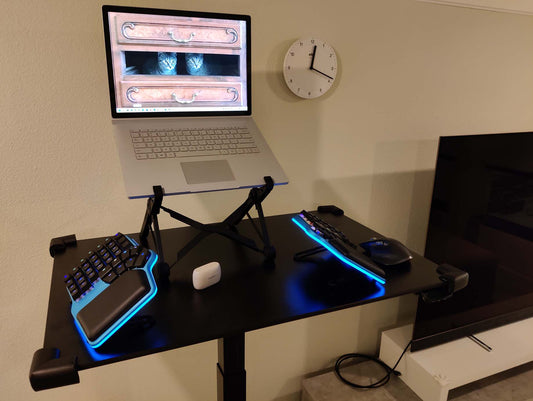
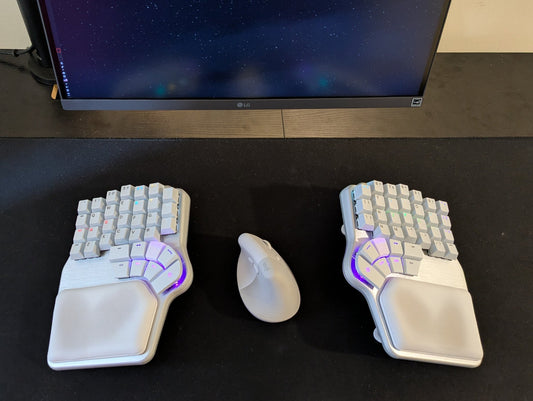
There's nothing preventing modern keyboards from being split in half and turned inwards or split apart.

So you can keep your hands aligned with your arms and don't have to bend your wrists like on this keyboard.
Let me show you a few keyboards that do this: For example, this is the Kinesis Advantage.

You can see the columnar layout, and it's split in half.
So your hands are now aligned with your forearms, and you're not bending your wrists.
But you can also completely split the keyboard in half, giving you something like the Dygma Defy.

Now, with a fully split keyboard, you can adjust it exactly as you want.
Maybe closer together so your arms are aligned, and your fingers move vertically.
Maybe wider apart, still your arms align, so no bending your wrist and still moving your fingers vertically.
In fact, there are some keyboards that have this split design or split layout without the columnar layout, yet still keep row-staggered keys.
That's because we are really used to the row stagger layout, and it's easier to adapt to those keyboards.

3. Backspace and Enter
Let's move now to one of my favorites, the return and backspace keys.
Typewriters have backspace, but it's rarely used because once you've typed, you cannot delete.
It's already inked on the paper.

But on modern keyboards, the backspace key is among the most-used.
Then there is return, which doesn't exist on typewriters because return comes from the carriage return key.

This carriage return key was placed in one of the few remaining spots on the layout, the one here between backspace and shift.

So, where's the problem?
Backspace and return are used really frequently, and they are placed far away from your fingers.
4. Oversized Space Bar
Why is there a huge space bar on modern keyboards?

On typewriters, it makes total sense that there is a huge spacebar, because when you type on typewriters, your thumbs are not resting on the spacebar.

You're actually floating your hands because you need to apply a lot of pressure.

But on modern keyboards, your thumb is already resting there; you don't need a huge space bar for both thumbs.
If I were to split that key, I would have space for backspace and return on my thumbs.
Let's see some keyboards that do that.
This is the UHK60, which, as you can see, has split the space bar into four keys that I can use for space-related special function modifiers.

You can remap them to whatever you want, like backspace or return, because this keyboard is programmable and you can adjust what every key does.
That is a common trend among split keyboards. They're not only split, but you can also program them, and you can go even further.
The Dygma Raise 2 or the UHK80 has four thumb keys on each side. So you can imagine the possibilities.
You can have a space on both sides, then maybe backspace or press Enter. You could also have the delete or any other keys.
This is possible because once you're resting your thumbs here, they can be very precise, and you don't need to look down to press the keys that you want.
And you can take it even further. The Dygma Defy, for example, has 16 thumb keys, eight on each side.

This can seem overkill, but the reality is that each person has different thumb dexterity.
Some people call their thumbs outward and inward, and others downward. Some people place their hands more slanted, and others more upright, which changes the arc the thumb describes.
So having so many keys allows each person to find at least 4 that they are comfortable with.

The thumb keys free up so much work from your pinky that once you start using them, you will never want to go back to a normal keyboard.
5. Positive Tilt
Positive tilt is when the back of the keyboard is higher than the front. So there's a positive angle here.

This comes from another physical constraint on typewriters.
Just like with the row-staggered layout, there is another stagger on the keyboard, this time vertically, which also allows the levers to reach the mechanism up here.
If they weren't staggered like that, there would be collisions when you press the keys. Each key needs a space to go down.

In electronic typewriters and early keyboards, it was more prevalent, and it has been gradually turning down.

This positive tilt is also why many keyboards still offer positive tilt legs like this one. So you can tilt your keyboard upward.

This isn't really great for ergonomics because the more you tilt the keyboard, the more you bend your wrists.

Most ergonomic keyboards have a neutral tilt or even offer reverse tilting, like the Dygma keyboards.
This is especially useful if you are really tall or sit really high, or if you're using a standing desk and want to make sure that your wrists are perfectly aligned with the keyboard.

6. Caps Lock
Why is Caps Lock called Caps Lock and is placed next to Shift? Well, because caps lock actually locks shift like physically.

Shift on typewriters actually shifts the carriage upward, so when you press a key, instead of getting the lowercase, you get the uppercase.
That's because the levers have two legends, one for lowercase and one for uppercase. When you type normally, you get lowercase, and when you press shift, you shift the carriage and then get uppercase.

What Caps Lock does is literally lock that shifted position. You can see that the keys remain pressed and the carriage remains lifted.
If I want to get lowercase, I press Shift, and that releases the Caps Lock.

The thing is, Caps Lock is in a really premium position because of that physical need to lock Shift. But on a normal keyboard, there are no physical constraints.
Caps lock doesn't have to be there. It could be somewhere else. And we could use that key for something more useful.

If you don't have a split keyboard with multiple thumb keys, you could always remap Caps Lock to something like Return. And caps lock is much closer.
If your keyboard is not programmable, you can even do this on the software level with tools like the Windows Layout Editor or AutoHotkey (on Mac, Karabiner or Kanata).

7. Two-Character Limitation
As I explained, what Shift does is move the carriage up so you can activate the legends that are capitalized or symbols.
So you're limited to just two characters per key. In the case of the alpha keys, lowercase and uppercase, and in the case of the numbers, the number and a symbol, and the other keys, just two symbols.
But why are we keeping that limitation on normal keyboards? Let me explain.
What if instead of one shift, we could have as many shifts as we wanted? So, depending on the shift that you press, each key would do a different thing.
That way, you wouldn't need to keep symbols around the keyboard. You could press shift two, and then your symbols would be here on the home row or all around it. You could even have a shift three or shift four where your numbers are not in the number row but are closer to your fingers.

That is called layers on programmable keyboards, but they're just special customized shifts. And if you have multiple thumb keys, like with the Raise 2, those special shifts are really easy to access.

You can press one of the thumb keys to get your numbers and the arrows. Or you can press this other one and get media keys, F keys, and whatnot.

You can customize this to your liking with symbol layers, shortcut layers, or anything that you want, up to nine special shift keys.

8. QWERTY
And finally, let's talk about the thing that keyboards inherited from the typewriter that makes the least sense: Qwerty.
Qwerty receives its name from the first five letters on the top left Q W E R T Y.
Qwerty was the layout on the first commercially successful typewriter, the Remington number one from 1874. There were other layouts at the time, and proposals afterward, like Dvorak or Colemak.

But Qwerty was already spread so much that it was difficult to make this shift. Everybody would need to relearn the new layout. Think about hundreds of thousands or even millions of typists all around the world.

Once again, the reason behind QWERTY lies in mechanical limitations. You see, if you press two keys that are next to each other, they will clash. So if you press QA in a fast succession, they would clash.

So was laid out so that the most common biograms in English, like th or er, were not next to each other in the layout, but on the levers themselves. That's the basic design principle for Qwerty. Some people say it was designed to make people type slowly, but that's not exactly true. It was all because of this mechanical limitation.
Why, if that mechanical limitation is now gone, did we keep using QWERTY? Well, for the same reason: when electronic typewriters and standard keyboards were introduced, people already knew how to type on the Qwerty layout, so it made sense to keep it.

However, now it's easier than ever to switch. Before, you will need to buy a special typewriter with a different key disposition. And now, even if your keyboard says Qwerty, you can go to your computer's input language and change it to whatever layout you want: Dvorak, Colemak... So it's super easy to try a new layout and if you don't like it, teach it away.

Of course, that time to relearn a new layout would be a lot. I recommend watching my videos about Miquel's journey from QWERTY to Engram and back. This transition can be a little easier with programmable keyboards, which let you customize the layout to your liking.
Bonus: Flat Keyboards
So these are the eighth things that keyboards have inherited from typewriters that make no sense. But since I like you so much, here's a bonus one.
Once again, it all comes down to the mechanical typewriter's physical limitations. This has to be one big slab that activates levers that then send ink to the paper. But once we move that to electronics, those limitations are no longer there.

As we explained, splitting the keyboard in half opens even more possibilities. You see, when we type on a normal keyboard, not only are our wrists slightly bent outwards, which is called wrist deviation, but we are also suffering from hand pronation. That means when you rotate your hands downward with your palms facing down to place them on the keyboard.
When you do that, you cross the bones on your hands, the ulna and the radius, and that pinches the muscles and the veins on your wrists, leading to pain over time.

How do you fix that? Well, you need to rotate your hands back and try to type like this, which you can do with a split ergonomic keyboard with tenting, like the Dygma Raise 2 or the Dygma Defy.

As you can see, when typing like this, hands are no longer pronated; they're more in a natural position, like when you're grabbing a ball, walking, or shaking hands.

Of course, this might be too much. So that's why our keyboards have different positions, from 60° down to just 5 °, and everything in between, like 20°. This is because each person is different, and we want to give you as many options as possible.
Of course, these are not the only keyboards with tenting. There are others out there, like the UHK80 or the Moonlander.

If you want to learn more about other tenting solutions, check out this video.
Final Thought
And now the big question: If keyboards make no sense, why aren't we all typing on something like the Dygma Defy? Well, it's a combination of three things.
Computer keyboards weren't designed from scratch. There was a transition from typewriters to computers, with electronic typewriters that grew ever more complex, eventually leading to the introduction of computers and keyboards designed to make that transition easier.
So they copied the layout from those electronic typewriters, which, at the same time, had copied it from the typewriter.
The second is that transitioning to a split mechanical keyboard is not immediate. You have to retrain your massive memory so you don't feel the benefits immediately. You might need some weeks of adaptation.

And finally, there is the cost. Even though some people spend a lot of money on custom mechanical keyboards, most people just use the keyboard that came with a laptop, with a computer, or maybe a cheap keyboard that you can get for less than 100 bucks, sometimes even 20$ or 30$. Ergonomic mechanical keyboards are normally more expensive, starting at around $300 and even going up to $700 or $800.
The combination of these three is what prevents some people from making the switch. But those who have made it will never, ever, ever go back to a normal keyboard, because it really doesn't make sense.
And now is where we would like to hear from you. Which one of these inherited features did you find the most surprising, or which one is the one that blows your mind? Have you switched to an ergonomic keyboard? In that case, which one? Hope it's ours 😜
Join the discussion on Reddit or Discord and share your thoughts.
See you there 💜