Have you ever wondered what an overengineered keyboard looks like?
Today, you are in luck; we are going to explore eight design details in the Dygma Raise 2 and Dygma Defy that might make you question the sanity of the engineering team.
To do that, we are going to take them apart.
For the most part, we won’t need much. Just a keycap and switch puller, and a screwdriver.
But we'll need a saw to reveal the most overengineered part of the keyboard: the palm pads. So make sure to read or watch until the end.
The Split Mechanism of the Dygma Raise 2
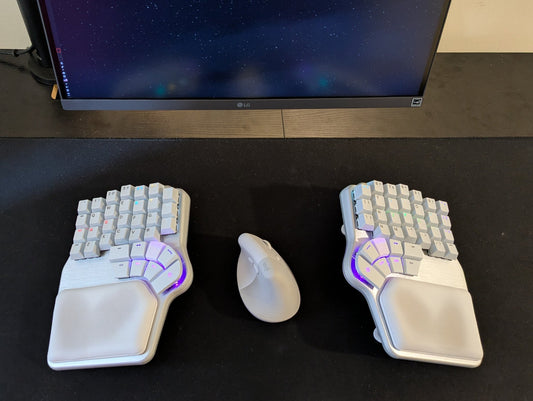
One of the party tricks of the Dygma Raise 2 ergonomic keyboard is that it looks like a normal keyboard until you split it apart and then put it back together.

To make this possible, the keyboard uses a complex mechanism that keeps both halves connected while still allowing them to detach easily.
Inside the joint, you can find a succession of male and female pins that connect both sides together.

There are also magnets inside the keyboard to help keep both halves aligned.
On top of that, the joint tension can be adjusted. Using the small screws hidden near the joint and a screwdriver, you can tighten or loosen the connection.

You can make it very sturdy so the halves stay firmly together, or loosen it so it is easier to snap them apart.
Convex Thumb Keys
Now let’s talk about one of the most interesting details: the thumb keys.

Most ergonomic keyboards simply reuse normal keycaps for the thumbs. The Dygma Raise 2 takes a different approach.
If you look closely, you will notice that the thumb keycaps are convex instead of concave.

This matters because thumbs move differently from fingers. Fingers press keys mostly with their tips, while thumbs often press keys using a larger surface area.
With a concave keycap, your thumb tends to hit the edges. With a convex keycap, the surface is smooth all around, which makes it more comfortable to press.

Another important detail is that the thumb cluster includes two rows of keys with different heights.

The top row uses standard MX switches, while the bottom row uses low-profile switches.
This height difference allows you to press the top keys without accidentally pressing the bottom row.
The Overengineered Thumb Cluster of the Dygma Defy
If there is a keyboard where the thumb cluster was taken to the extreme, it is the Dygma Defy.

This keyboard pushes the limits of how many thumb keys can fit in a cluster.
The switches are placed very close together, and the keys are as small as possible while still remaining distinguishable by touch.
To achieve this, the keys are separated by small V-shaped gaps.

These gaps allow your thumb to quickly detect the position of each key as you slide across the cluster.
There are also homing keys to help you find the base position without looking.
Like on the Raise 2, the bottom row uses low-profile switches, giving both rows different heights so they can be pressed independently.

One of the thumb keys is also chamfered, which makes it easier to slide from the low-profile keys to the regular keys.
You can even slide your thumb across the keys smoothly.

The Tenting Mechanism
Another feature that received extra engineering attention is the tenting mechanism.
Instead of simple metal hinges like many ergonomic keyboards, the Dygma keyboards use aluminum legs with rods and multiple-angle positions built into the base.
These legs can be folded away when tenting is not needed.
But the interesting part is a small usability detail: how the legs are removed.

Instead of forcing users to grab the leg directly, the keyboard includes a small recess where you can easily place your finger and lift it.

On the Raise 2, the rods are positioned so close to the leg that there is no room for a finger. The solution was to create a recess on the base's side.

These solutions complicate the keyboard and leg molds, but they improve the user experience.
Hidden Details on the Back of the Keyboard
Looking at the back of the keyboard reveals two additional details.
The first one is a small ramp designed to help the Neuron, the brain of the keyboard and Bluetooth adapter, slide easily into place.

Without that ramp the mold would have been much simpler, but inserting and removing the module would be harder.
The second detail is the presence of four M3 screw holes.
These holes allow you to attach accessories using an adapter that includes a ¼-inch screw mount, the same standard used in camera gear.

This allows the keyboard to be mounted to tripods, camera arms, or other adjustable setups.

We even designed dedicated arms available at dygma.com/arms.

With those arms, you can position the keyboard beyond standard tenting.
You could mount it to a desk arm, or even attach it to the arms of a chair.

We even created 3D-printed accessories imitating a holster-style mount inspired by the wild west.

RGBW LEDs and the Redesigned PCB
One of the most complex engineering decisions on these keyboards is the use of RGBW LEDs.
Most keyboards use RGB LEDs, combining red, green, and blue light to create other colors.
But when you mix RGB to create white, the result can look slightly bluish, reddish, or greenish.
To get true white lighting, these keyboards use LEDs with a dedicated white diode.

The problem is that RGBW LEDs are only available in a top-mounted configuration.
This required redesigning the keyboard PCB.
The original Raise used a 1.6 mm PCB. The new version was reduced to 1 mm in thickness.
A 0.6 mm felt layer was added to protect the LEDs and allow proper switch installation.
Because of this design, the PCB now needs to be assembled on both sides, which is more complex than standard keyboard PCBs.

Another small PCB is also soldered to the main board to support the low-profile switches used in the thumb cluster.
This extra PCB sits slightly higher to compensate for the different mounting height required by low-profile switches.
All of this complexity exists for one reason: achieving pure white lighting.
The Top Panel Details
The top panel also includes several small engineering details.
One of them is a small recess for the battery.

Batteries can expand slightly when heated during use, so the recess provides space for that expansion while still allowing the use of a large battery.
There are also multiple recesses for low-profile switches.

Low-profile switches clip from west to east, while standard switches clip north to south. These recesses accommodate those different clipping mechanisms.
You may also notice three magnets embedded in the top panel.
These are used to hold the magnetic palm pads.
The Multi-Layer Palm Pads
Finally, we arrive at the most overengineered component: the palm pads.
The original palm pads on the first Dygma Raise were relatively simple: adhesive silicone with a synthetic leather TPU cover.
The new palm pads are much more complex.

Inside the palm pad, you can find multiple layers.
There is an anti-slip layer glued to the base, followed by structural plastic that gives the pad its shape.
Then comes a layer of dense foam, another plastic reinforcement layer, and finally the silicone layer that gives your palms a soft feel when resting.
Everything is wrapped in synthetic leather for the final finish.

Inside these layers are also three magnets that align with magnets in the keyboard base.
There is even an additional layer of custom-cut double-sided adhesive.
In total, the palm pad construction includes eight separate layers.

And that’s it.
Those are the details that turn these keyboards into truly overengineered keyboards.
Some of these decisions may seem excessive, but each one solves a specific design or usability challenge.
Now we want to hear from you.
Which of these details is your favorite? Or do you think the engineers went too far?
Join the discussion on Reddit or Discord and share your thoughts.
See you there 💜