At first glance, ergonomic keyboards can look a little… unusual.
Split layouts, strange key shapes, thumb clusters, tenting legs... sometimes they look like they were exposed to the evolutionary experiment.
But every one of those design decisions exists for a reason. Ergonomic keyboards are designed to reduce strain on your hands, wrists, and shoulders when typing for long periods.
Understanding why ergonomic keyboards look different helps explain how they improve typing comfort and efficiency.
Split Layouts vs Fully Split Ergonomic Keyboards
One of the most recognizable features of an ergonomic keyboard is the split keyboard layout.
On a traditional keyboard, both halves of the keyboard are fixed together. This forces your wrists to angle outward slightly when typing.

By splitting the keyboard into two halves and tilting them inward, your wrists can stay aligned with your forearms, which is a much more natural typing position.
Some ergonomic keyboards use a fixed split layout, where the halves are separated but cannot be moved. These keyboards usually have a small separation between both halves and a slight inward tilt. A simple example would be keyboards like the Perixx models.

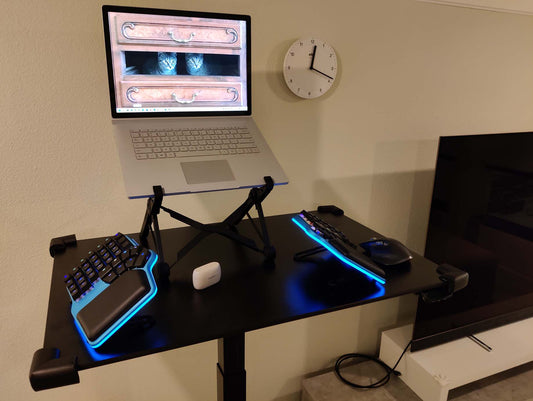
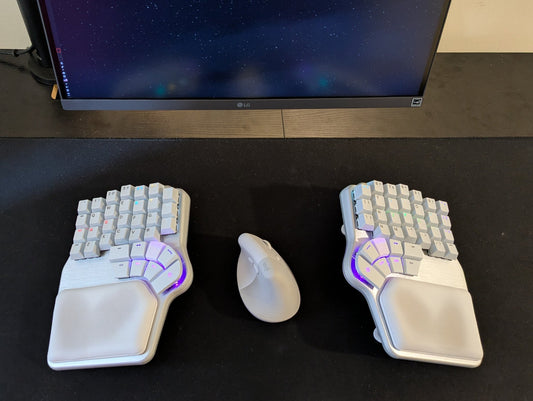
Others, like the Dygma Raise 2 or the Dygma Defy, are fully split keyboards. This means you can use them like a normal keyboard, keep the halves close together, or separate them as much as you like.

The more you separate the halves, the less inward tilt you need to keep your wrists aligned. This flexibility allows you to adapt the keyboard to your shoulder width and typing posture.

For example, some people prefer to keep the halves fairly close together, while others separate them much wider and adjust the angle slightly inward to match how they type.

Staggered vs Columnar Keyboard Layout
Another major difference in ergonomic keyboards is the way keys are arranged.
Traditional keyboards use a staggered layout, inherited from mechanical typewriters.

The staggered rows were necessary because typewriter mechanisms needed space for the levers that struck the paper.

However, our fingers don't move diagonally like that. They move mostly up and down.
That’s why many ergonomic keyboards use a columnar layout, where keys are arranged in vertical columns that match the natural movement of each finger.

This allows your fingers to move vertically rather than diagonally, which can reduce joint strain over time.
That said, many ergonomic keyboards still keep the staggered layout. The reason is simple: people have built decades of muscle memory typing on staggered keyboards. Moving directly from a standard keyboard to a fully columnar one can feel overwhelming.
For this reason, some users transition gradually, starting with a split staggered keyboard like the Dygma Raise 2 before moving to a fully columnar keyboard like the Dygma Defy.

Thumb Clusters on Ergonomic Keyboards
On a standard keyboard, your thumbs are mostly used for the space bar.
This is inefficient, because the thumbs are actually your strongest and most dexterous fingers.
Ergonomic keyboards solve this by introducing thumb clusters, groups of keys that can be pressed with the thumbs.

These keys are often used for functions normally handled by the pinky fingers, such as Backspace, Enter, Shift, and modifier keys.
Using the thumbs for these tasks reduces the repetitive strain on the weaker pinky fingers.
Different keyboards offer different numbers of thumb keys. The Dygma Raise 2 includes four thumb keys per side, while keyboards like the Dygma Defy feature eight per side.

The Moonlander also has four thumb keys, while smaller keyboards like the Voyager provide only two.

Having more thumb keys does not necessarily mean you need to use them all. They exist because every person places their hands on the keyboard differently. Some people find the outer keys easier to reach, while others prefer the inner ones, depending on hand size and thumb movement.

There are also different types of thumb clusters. Some keyboards use an arc-shaped thumb cluster, designed to follow the natural arc of the thumb. This layout can be found in keyboards like the Dygma Defy, the Glove80, or the Keyboardio Model 100.

Other keyboards use a box-style thumb cluster, arranging the keys in a grid. This can be seen in keyboards like the Moonlander, the Kinesis Advantage, or the ErgoDox EZ.

While box layouts offer many keys, they sometimes require you to move your hand slightly to reach the outer keys. For many users, having three or four comfortably reachable thumb keys tends to be the sweet spot.
Number of Keys on Ergonomic Keyboards
Many ergonomic keyboards also reduce the total number of keys compared to a full-size keyboard, which typically has 104 keys.
Some keyboards keep around 80 keys, like the Glove80 or the UHK80, removing the number pad but still including the function row and navigation keys.

Others go even further. Keyboards like the Dygma Raise 2 or the Dygma Defy reduce the number of keys and rely on layers to access additional functions.
Layers allow multiple key functions to exist on the same physical key. For example, holding a specific key might activate arrow keys under the ESDF cluster, while another layer might activate function keys or media controls.

This allows the keyboard to remain compact without losing functionality. In fact, some experimental keyboards reduce the number of keys dramatically, sometimes down to 36, 34, or even fewer.

Keyboard Tenting
Another distinctive feature of ergonomic keyboards is tenting.
When typing on a flat keyboard, your palms face downward, which can cause the bones in your forearms to cross and create tension in your wrists.
Tenting raises the center of the keyboard so your hands rotate into a more natural handshake-like position.
Even small tenting angles can reduce strain. Some basic ergonomic keyboards offer around 7.5 degrees of tilt, while more advanced keyboards can reach angles of 30°, 45°, or even 60°.

There are several ways keyboards implement tenting. Some use external accessories, such as metal plates with adjustable hinges. These allow you to change the angle, but often require tools to adjust and may add extra height to the keyboard.

Other keyboards integrate the tenting system directly into the keyboard itself. For example, keyboards like the Glove80 use adjustable legs, while Dygma keyboards feature built-in tenting legs that can fold completely into the keyboard when not in use.

Keywells on Ergonomic Keyboards
Some ergonomic keyboards take things even further by introducing concave keywells.

In these keyboards, the keys are arranged in a curved surface that follows the natural arc of your fingers.
This makes it easier to reach the top and bottom rows without stretching your fingers.

Typing on keyboards with a key well can feel extremely comfortable, but they do have some drawbacks. The keyboard becomes taller, which means you may need to sit slightly higher to keep your wrists parallel to the desk.

Additionally, the curved design makes these keyboards harder to manufacture and often prevents the use of hot-swappable switches, meaning the switches are soldered directly to the PCB.

Palm Rests and Palm Pads
Many ergonomic keyboards include palm rests or palm pads.
These are designed to support your palms when you're not typing.

Ideally, when typing, your hands should hover slightly above the keyboard, but palm pads can help reduce strain during pauses.
Different keyboards use different materials. Some basic palm rests are made of plastic, while others use wood or soft padded materials. Softer surfaces can feel more comfortable, but built-in palm rests may wear out over time.

Some keyboards, such as the Dygma Raise 2 or the Dygma Defy, include detachable palm pads. These can be cleaned easily or replaced if they wear out, and they remain securely attached using magnetic connections.

Wired vs Wireless Ergonomic Keyboards
Connectivity can also influence the usability of an ergonomic keyboard.
Split keyboards often use cables to connect the two halves. This can sometimes limit how far apart you can place them.

Wireless ergonomic keyboards remove those constraints, allowing you to position each half exactly where you want it without cables getting in the way.
Why Ergonomic Keyboards Look Different
Ergonomic keyboards may look strange compared to traditional keyboards, but their design choices are intentional.

Split layouts align the wrists, columnar keys match natural finger movement, thumb clusters reduce pinky strain, and tenting improves wrist posture.
Each feature exists to make typing more comfortable and reduce the risk of long-term strain.
What ergonomic keyboard feature matters most to you?